
The JobTread AI Connector: What it is and How it Works
By Meredith Dobbs
JobTread’s AI Connector brings Claude directly into your construction workflow, so you can pull job details, update budgets, and manage projects through a simple conversation instead of clicking through screens.
This post covers what the AI Connector does, how to set it up, and the best practices that will help you get the most out of it from day one.
What is the AI Connector?
The AI Connector is an MCP Server built by JobTread that securely connects your JobTread account to AI tools like Claude (our recommended platform) or any other AI platform you choose.
It’s important to note that AI is not built in to JobTread. It’s a “bring-your-own” AI platform to JobTread.
When connected to an LLM like Claude or ChatGPT, this connection enables AI to interact with your JobTread jobs, budgets, templates, and data to assist with workflows, analysis, and content creation.
What is an MCP Server?
An MCP (Model Context Protocol) Server is a secure bridge between software and AI tools. Think of it as a direct connection between an AI platform and your JobTread data.
The AI Connector gives your AI platform direct access to JobTread. No more copying and pasting into a chat window. It can read from and write to your account in real time, using plain language instructions you provide.
It allows AI platforms to:
- Access relevant JobTread data (based on permissions).
- Perform actions inside JobTread (when enabled).
- Respond with context-aware outputs based on your real jobs and data.
How Does it Work?
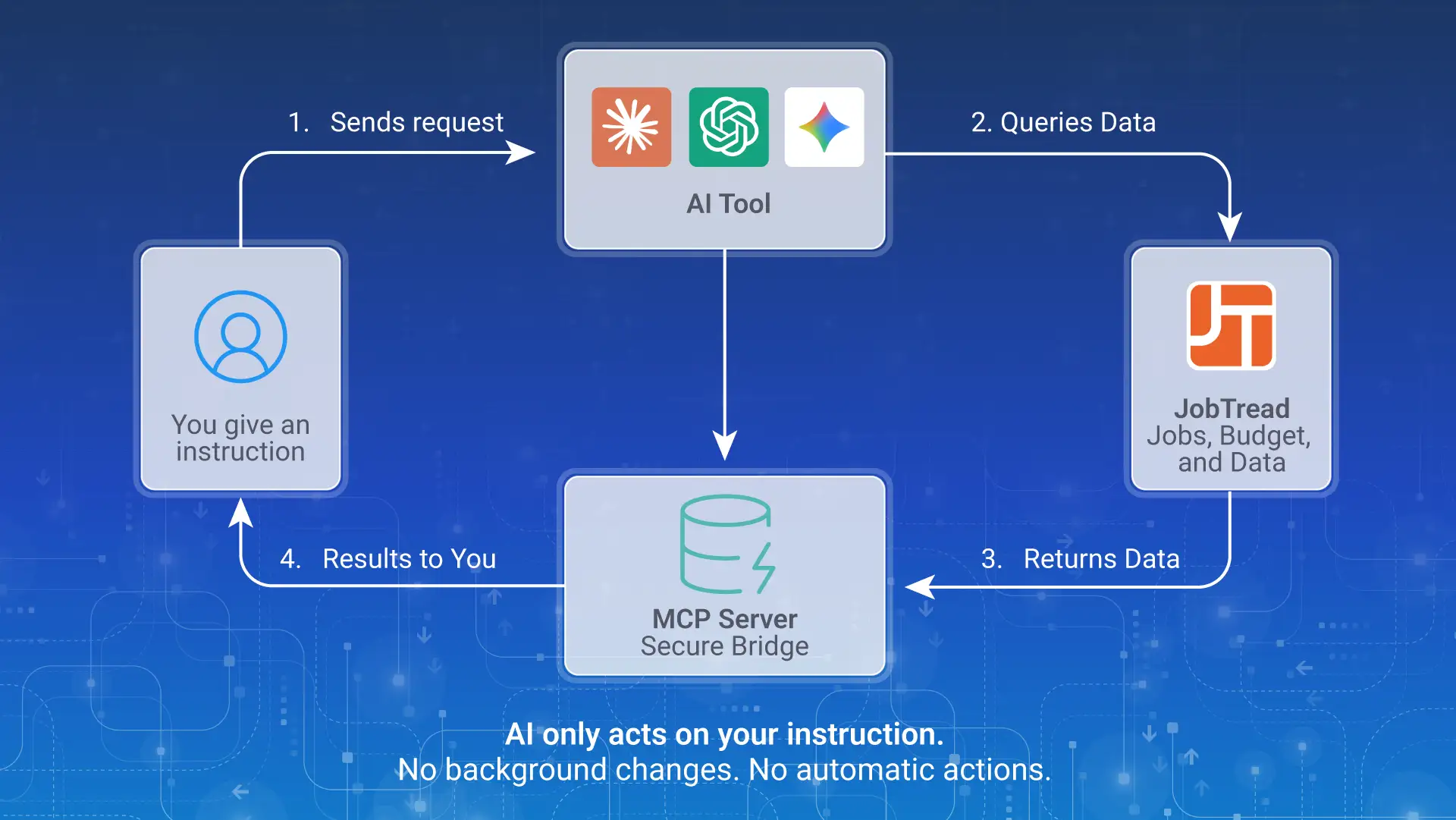
When you connect an AI tool to JobTread using the MCP server:
- The AI tool (say, Claude) sends requests to JobTread on your behalf.
- JobTread retrieves the requested data or performs the requested action.
- The AI tool returns results or completes tasks within JobTread.
It’s important to note that AI will only take action based on your instructions. It does not run automatically in the background or make changes without your input. However, you can also use the AI Connector to automate recurring tasks whenever it makes sense for your workflow.
For example, you could ask the AI to automatically generate a weekly summary of active job statuses and send it to you as a Google Sheet every Monday morning at 8am. The use cases are endless.
Simplify and Centralize Your Business.
Learn how JobTread can help you focus on what matters most.
Risks and Considerations
When connecting an AI tool to your JobTread account, think carefully about the level of access you’re granting. The MCP server operates using your JobTread credentials, meaning any action the AI takes is performed as you, under your account permissions.
Make sure you understand the risks before connecting, and follow the use case guidance below.
When instructed, the AI can create, edit, and in some cases delete data in your JobTread account. Some of those actions may be difficult or impossible to reverse.
AI tools interpret your instructions and decide how to act on them, so vague or ambiguous prompts can lead to unintended results. Always review what the AI plans to do before confirming.
There is no global undo function. If the AI modifies records, sends documents, or deletes data, those changes take effect immediately and cannot be restored.
Your JobTread account contains customer information, financial data, contracts, and job records. Only connect AI tools you trust, and always use them in a secure, private environment.
Any action taken through the MCP server is treated the same as if you performed it yourself. Always verify AI output before allowing it to interact with your live data.
The Importance of Understanding JobTread
Before connecting any AI platform to JobTread, make sure you have a solid understanding of how the product works. AI tools are only as reliable as the person reviewing their output.
If you approve a budget generated by Claude that turns out to be inaccurate, that mistake can have real consequences for your bottom line. Knowing JobTread well means you can catch errors in real time before they turn into profit loss.
If you are new to JobTread, we highly recommend working through the Getting Started Video Guide in the JobTread Help Desk before setting up any AI tools. This guide walks you through the essential steps to get your account set up and covers how JobTread connects your estimating, budgeting, scheduling, communication, and financials all in one place.
The better you know JobTread, the more confidently and safely you can put AI to work.
Safe Use vs. Aggressive Use
Not all AI actions carry the same level of risk, and understanding that difference is key to using AI effectively and responsibly. Some tasks are low stakes by nature. Drafting an email or summarizing a document can be reviewed and corrected before anything is sent or saved.
Other tasks are higher stakes. Deleting records, sending communications on your behalf, or making changes to financial data can be difficult or impossible to undo.
Use the following framework to guide how you interact with AI through the MCP server. It is designed to help you think clearly about when to let AI act on its own, when to review before confirming, and when to keep a human in the loop from start to finish.
Safe Use Cases (Recommended)
The lowest risk is when the AI retrieves or drafts information for your review. It does not modify live data.
Guidelines:
- Ask the AI to pull information from JobTread for you to review.
- Ask the AI to draft documents, messages, or notes that you approve and send yourself.
- Ask the AI to summarize or analyze data without making changes in JobTread.
Example: “Summarize all open bids from this month and tell me which ones are past due.” The AI reads data and presents a summary. Nothing in JobTread changes.
Aggressive Use
Higher risk involves using AI to modify data in your JobTread Organization or send messages from you that haven’t been reviewed. Use these actions with caution.
Guidelines:
- Only allow the AI to take action on records you have reviewed.
- Confirm the exact scope of what will be changed before proceeding.
- Avoid bulk actions (e.g., updating all records of a type) until you are confident in the results.
- Never instruct the AI to send external-facing documents (proposals, invoices, contracts) without reviewing them first.
Example: “Create a change order for Job #4821 and send it to the customer.” This instructs the AI to both create and send a document. Consider breaking this into two steps: draft first, review, then send.
Strong vs. Weak AI Prompts
Clear, detailed prompts are critical when using AI tools with JobTread. The quality of your results depends on how specific and structured your request is. Vague prompts lead to incomplete or incorrect outputs.
What to Include in a Strong Prompt
When possible, include:
- Job/Customer/Vendor name or number
- Specific task or outcome
- Relevant details (cost codes, dates, scope, etc.)
- Desired format (summary, email, list, etc.)
Be specific. The more context you provide, the more useful and reliable the output will be.
Prompt Examples:
- “Summarize the current status of Job #2045, including budget vs. actual costs, any overdue schedule items, and recent activity in the last 7 days.”
- “Draft a professional email to the client for Job #1188 explaining a 3-day delay due to weather, include reassurance on next steps, and maintain a positive tone.”
- “Review Job #3102 and identify any cost codes that are over budget by more than 10%, including the variance amount and possible causes.”
AI is not here to replace the expertise and judgment that make a great contractor. It is here to handle the time-consuming, repetitive work that gets in the way of it.
The JobTread AI Connector gives you a direct line between the AI tools you already use and the job data that runs your business, so you can move faster, communicate better, and make more informed decisions without adding hours to your day.
Like any powerful tool, it works best in the hands of someone who knows what they are doing. Learn your craft in JobTread first, prompt with intention, review before you confirm, and let AI do the heavy lifting on everything else.
The contractors who figure this out early will have a real advantage. Now is a good time to start.
Disclaimer: The tips in this post are based on general AI prompting best practices. JobTread provides the AI Connector as a tool to connect your account to third-party AI platforms. We are not affiliated with, partnered with, or responsible for any AI platform or its outputs. Use of AI tools in connection with your JobTread account is at your own discretion, and we encourage you to review any AI-generated content before applying it to your business.
FAQ: JobTread AI Connector
Elevate your company to new levels of success!
Let one of our experts show you how JobTread will get you organized, save your time, and increase your profits.
Book a Demo

Meredith Dobbs is a Digital Marketing Specialist at JobTread with a background in education, research, and strategic communication. She specializes in creating clear, trustworthy messaging that is rooted in research, crafted for connection, and driven by a deep care for customers and their businesses.