
JobTread vs. Jobber: Construction Project Management vs. Field Service Software
By Meredith Dobbs
Contractors who are researching software often weigh JobTread against Jobber, so it helps to understand what sets them apart.
The main difference between JobTread and Jobber is the type of work each one was designed to support. JobTread is a construction project management platform built for project-based work while Jobber is a field service management platform built for recurring service work. Both appear in searches for construction management software, but they serve different kinds of businesses.
JobTread is designed for contractors who handle estimating, budgeting, takeoffs, change orders, and complex job financials. Its customer base spans commercial contractors, pool builders, home builders, remodelers, deck builders, roofers, and specialty contractors with users ranging from small businesses to commercial builders generating millions in annual revenue.
On the other hand, Jobber is built primarily for service businesses that rely on recurring visits, route planning, and maintenance scheduling. Its core users include trades such as landscaping, cleaning, plumbing service, HVAC service, and pest control along with small home service operators.
Both platforms can be used by contractors, but they solve different operational problems. The right fit comes down to whether a business manages project-based construction work or recurring service work.
JobTread vs. Jobber:
Pricing, Features, and Integrations Compared
The chart below compares the primary similarities and differences between JobTread and Jobber.
 | Features |  |
|---|---|---|
| Construction Management and Estimating | Core Markets | Field Service Management |
| Monthly Pricing: $199 / month Save 20% with Annual Pricing | Pricing | Multiple Pricing Plans and Tiers* Team Plans: Monthly, No Commitment Plus Plan = $630 / month for three months, then $699 / month Grow Plan = $360 / month for three months, then $388 / month Connect Plan = $180 / month for three months, then $199 / month |
| +$20 / month per internal user** | Per User Pricing | +$29 / month for additional users once you exceed your plan's user limit* |
| Yes | Free, Unlimited Vendor and Sub Users | No Subs and vendors cost an additional $29 / month per person. |
| Yes | All Features and Integrations Included in One Price | Varies by plan* |
| No | Best for Service Businesses | Yes |
| Yes | Best for Construction Businesses | No |
| Yes | Client Portals | Yes |
| Yes | Custom Automations | Varies by plan* |
| Yes | Invoicing | Yes |
| Yes | Gantt Charts | No |
| Yes | Purchase Orders | No |
| Yes | Accounts Payable System | No |
| Yes | Change Order Feature | No |
| Yes | On-Screen Takeoff | No |
| Yes | Selections | No |
| Yes | Onboarding Support | Varies by plan* |
| Yes | Job Costing | Varies by plan* |
| Yes | WIP Reporting | No |
| Yes | AIA-Style Payments | No |
| Yes | Named Best of IBS | No |
*Jobber has 10+ pricing tiers. Please see Jobber’s pricing page for details. Pricing is current as of June 2026.
**Internal users are employees and certain non-employees like accountants who need full access to manage jobs, schedules, time, reports, and customer or vendor data while vendor, subcontractor, and customer portal users, plus field crew who only upload photos, log notes, and view their schedules or tasks, can be added as free, unlimited users.
Still Comparing JobTread vs. Jobber?
See how JobTread handles project-based construction work from estimate to final invoice.
The Pricing Plan Difference
One of the biggest differences between JobTread and Jobber is pricing. JobTread keeps it simple with a single price that includes every feature and integration, customer support, onboarding, and free, unlimited portals for external users. The only additional cost comes from adding internal users to the account.
What is an internal user?
Internal users include employees who need access to JobTread to view customer and vendor information, manage jobs, build and modify schedules, track time, and access reports. Accountants and certain other non-employees may also be considered internal users if they need access to JobTread data.
All vendor, subcontractor, and customer users are able to access an external portal to view and perform a limited set of activities in JobTread. These users are free and unlimited.
Additionally, certain field crew who will only be using JobTread to upload pictures, log daily notes, and view their schedule or check off tasks can also be added as free users. Users also have the ability to set permissions and assign roles in their JobTread accounts.
Tiered Price Breaks
JobTread pricing also improves as a company grows. Price breaks begin after the first ten internal users, so the cost per internal user goes down rather than up. That is a direct contrast to most construction management software where the price climbs as more users are added and as business revenue increases.
The table below shows the price breaks at each internal user tier.
The Importance of Robust Financial Tools for Contractors
Most contractors come to JobTread for the same reason: their projects grow more complex, and they need more powerful financial tools to manage them. As jobs grow in size and scope, contractors need tools that protect their margins from estimate to final invoice. Four of those matter most.
Job Costing
Without a clear view of costs, it is impossible to know how a project is truly performing. JobTread's job costing tracks every cost and expense against the budget in real time, giving contractors an accurate view of profitability on each job.
It manages vendor billing, reconciles vendor bills against purchase orders, and runs detailed reports that break costs down by category, phase, or individual item, showing exactly where a job went over or under budget.
Change Orders
Nearly every project includes work that falls outside the original contract. Instead of absorbing those costs, JobTread lets contractors capture them with a change order. Each change order pulls its cost items directly from the budget, which eliminates duplicate data entry and syncs back to the budget so everything stays transparent and up to date.
Change orders can be created from the office or the field, include attached files, and be sent for digital approval or printed as a clean PDF.
WIP Reporting
Work in progress reporting shows where each job stands financially before it closes. By measuring the costs incurred and the amounts billed against the budget, a WIP report reveals whether a job is over or under billed and the profit it is on track to deliver.
Because JobTread tracks costs against the budget in real time, that picture stays current across all active jobs in reporting and dashboards, which is a level of financial visibility a service-scheduling tool is not built to provide.
Selections
For contractors and remodelers, client selections can quietly erode a budget when they are not tracked closely. JobTread centralizes every selection in one place and ties each one to its allowance, so overages and underages are calculated automatically.
It can even generate change orders for overages, so the contractor gets paid for the upgrades. Clients can review options, see specs and pricing, and sign off on their selections right in the customer portal while JobTread tracks selection spending against every allowance.
Which One Is Right for Your Business?
Choose JobTread if your revenue comes from projects: jobs with budgets, phases, subcontractors, selections, and contracts that change along the way. Builders, remodelers, and specialty contractors who need estimating, job costing, and WIP visibility will outgrow service software quickly.
Choose Jobber if your revenue comes from visits: recurring maintenance, route-based scheduling, and quick quote-to-invoice work.
If your business does both, the deciding question is where your margin risk lives. When a mispriced project can erase a month of profit, project financials are the place to invest.
Schedule a demo to see how JobTread handles project-based work from estimate to final invoice.
Keep Learning
Frequently Asked Questions
JobTread is construction project management software built for project-based work like estimating, budgeting, job costing, change orders, and WIP reporting. Jobber is field service management software built for recurring service work like route scheduling, maintenance visits, and quick invoicing. The right choice depends on whether a business runs projects or recurring service routes.
Yes. Contractors who start on field service software often switch to JobTread when their projects need budgets, purchase orders, change orders, selections, and WIP reporting. Jobber does not include internal PO generation, change orders, takeoffs, or WIP reporting, which become essential as project size grows.
JobTread has one plan at $199 per month plus $20 per month per internal user with every feature, integration, onboarding, and unlimited external portals included, and per-user price breaks after ten internal users. Jobber offers multiple pricing tiers where features, support, and integrations vary by plan. (Verify current pricing for both platforms before relying on it; prices change.)
Internal users include employees who need access to JobTread to view customer and vendor information, manage jobs, build and modify schedules, track time, and access reports. Accountants and certain other non-employees may also be considered internal users if they need access to JobTread data.
All vendor, subcontractor, and customer users are able to access an external portal to view and perform a limited set of activities in JobTread. These users are free and unlimited. Additionally, certain field crew who will only be using JobTread to upload pictures, log daily notes, and view their schedule or check off tasks can also be added as free users.
Businesses built on recurring service visits, such as lawn care, cleaning, pest control, and service-call plumbing or HVAC, fit Jobber's route planning and maintenance scheduling model.
JobTread is the better fit once work becomes project-based with budgets, subcontractors, and contracts that change over the course of a job.
Jobber's job costing availability varies by pricing tier, and it does not offer WIP reporting. JobTread includes job costing and WIP reporting for every customer at one price with costs tracked against the budget in real time.
JobTread is construction project management software that helps contractors estimate, budget, schedule, and manage jobs while tracking costs, change orders, selections, and payments in one platform. It serves home builders, remodelers, commercial contractors, pool builders, roofers, outdoor living contractors, and specialty trades. It includes free unlimited external portals for customers, vendors, and subcontractors.
Want to take your business to the next level?
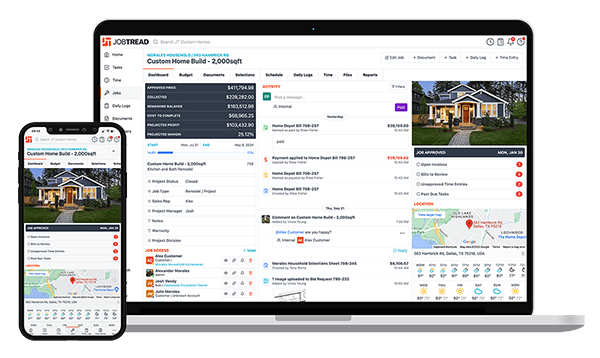
JobTread can help you win more jobs, complete them on time, and increase your profits.

Meredith Dobbs is a Digital Marketing Specialist at JobTread with a background in education, research, and strategic communication. She specializes in creating clear, trustworthy messaging that is rooted in research, crafted for connection, and driven by a deep care for customers and their businesses.